



Best Standing Desk with Dual Monitor Arms for Ergonomics
If you spend hours at a desk, you’ve probably felt the toll of a poorly arranged workspace. Neck, shoulder, or lower back pain can creep in when your monitors are too close or too high, your wrists tilt awkwardly, or your chair only supports you part of the day. An ergonomic setup isn’t a luxury—it’s a practical way to boost comfort, focus, and productivity. The right combination typically includes a height-adjustable desk and a dependable monitor mounting solution that keeps screens at eye level and within easy reach.
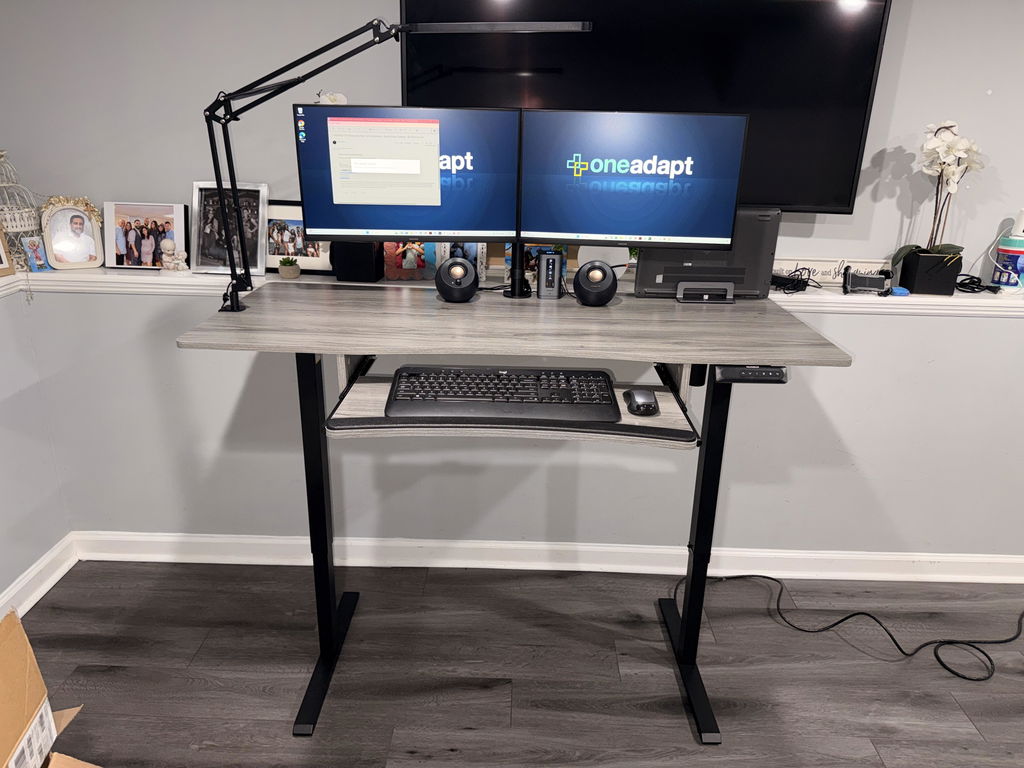
Enter the HUANUO Standing Desk + Dual Monitor Arms—a bundled solution designed for serious work-at-home setups. This electric standing desk features a sturdy steel frame and a powerful lift system that supports up to 176 lbs. It’s tested for 50,000 lift cycles, so it’s built to last. The desk surface is a seamless, one-piece panel that offers 30% more stability than models with joined sections. And paired with longer, taller monitor arms, this bundle accommodates larger desktops and multiple displays with effortless adjustability for a truly ergonomic workflow.
What you gain with this combination is a clean, expansive workspace that adapts to your needs—from sitting to standing and from a single screen to a multi-monitor arrangement. The flexibility isn’t just about comfort; it translates into better posture, more efficient line-of-sight for your tasks, and fewer distractions as you move between tasks. If you’ve ever looked for a “standing desk” on major retailers like Amazon, you’ve probably seen how reviews emphasize stability, smooth height adjustments, and ample legroom—the HUANUO bundle addresses all of that with a cohesive design.
Why this ergonomic bundle stands out
First, the desk itself is built for real-world use. Its 176 lb weight capacity means you can place a monitor, a laptop, a keyboard, and additional peripherals without worrying about wobble or fatigue over time. The seamless one-piece desktop surface contributes to stability and ease of cleaning, while the design reduces the risk of seams catching on cables or equipment. The desk’s lift system provides smooth, quiet elevation across a broad range, so you can go from sitting to standing in seconds.
Second, the monitor arms are purposefully designed for larger setups. With arms that extend up to 25.59 inches and a maximum height adjustment of 21.1 inches, you’ll have plenty of space to position two monitors side by side, or a monitor and a laptop in a comfortable, eye-level layout. The arms offer full motion: swivel from -90° to +90°, tilt from -30° to +85°, and rotation of 360°, so you can fine‑tune each screen for the most natural reading angle and reduced glare. This kind of versatility is particularly valuable for designers, programmers, or anyone juggling multiple windows and dashboards.
Understanding the benefits of a standing desk and dual monitor arms
Transitioning between sitting and standing has clear advantages. Standing desks can help reduce prolonged sitting, which is linked to back pain and fatigue. They also encourage more movement through the day, which can boost energy and focus during long work sessions. The addition of dual monitor arms eliminates the need to crowd monitors on a single surface, letting you keep a clean layout that supports better posture and easy line-of-sight alignment.
From a reviewer’s perspective, people often weigh options like an IKEA standing desk or a standing desk converter. The main trade-off is that a converter sits on top of an existing desk and may not offer the same stability or range as a purpose-built standing desk. For long-term use, a full standing desk with an integrated lifting mechanism tends to deliver more reliable height changes and steadier mounting for monitors. Many shoppers also search for “standing desk amazon” and other retailers—reviews across these platforms frequently highlight build quality, noise levels, and ease of assembly. The HUANUO bundle aims to address those concerns with a sturdy frame and thoughtful, ergonomic monitor mounting.
What to consider when choosing a standing desk and monitor arms
Choosing the right desk and arms isn’t just about looks—it’s about how the setup will support your daily tasks. Weight capacity is a practical baseline: the HUANUO desk supports up to 176 lbs, which covers most desktops, keyboards, and two monitors. A seamless desktop contributes to stability and easier cleaning, while longer arms offer more space for large or oddly placed displays.
Consider how you will use your screens. Full motion arms that rotate 360 degrees and swivel widely give you flexibility when editing, coding, or designing. If you’re deciding between options like a dedicated standing desk and a converter, think about long-term use and stability. A dedicated electric standing desk with integrated monitor arms often provides better reliability and a neater cable management solution than separate components.
For those who like to research before buying, it’s common to see users search terms like “standing desk ikea” when comparing styles and aesthetics. While IKEA‑style desks can be attractive, they may not always offer the same integrated height range, lifting speed, or dual-monitor support as purpose‑built bundles. If you’re looking for portability or a temporary upgrade, a standing desk converter could be a good starting point—but for a durable, long‑term setup, the HUANUO system delivers a more robust ergonomic solution. You’ll also see shoppers exploring options on Amazon and other retailers, where real-world reviews often highlight stability and ease of adjustment as key decision drivers.
Tips for a balanced and productive setup
- Position primary monitors at eye level to reduce neck strain. The HUANUO arms’ 21.1-inch height range makes this easier for most users.
- Maintain a relaxed shoulder position with a 90-degree elbow angle while typing.
- Keep keyboards and mice within easy reach to avoid wrist extension.
- Use cable management features to minimize clutter and hazards on the desk surface.
How to set up for optimal ergonomics
Getting the most out of your standing desk and monitor arms means a thoughtful initial setup. Start by assembling the desk on a level surface and confirming that the lift mechanism moves smoothly without noise. Place your keyboard and mouse at a comfortable distance so your elbows stay close to your body with a natural wrist position. Then install your two monitors on the extendable arms and adjust their height and angle to ensure the top of each screen sits roughly at or slightly below eye level.
With the arms extending up to 25.59 inches, you can keep your displays at the ideal viewing distance while ensuring your desk surface remains clear for documents or a laptop. The arms’ tilt and swivel ranges let you angle each screen to reduce glare and create a continuous line of sight between monitors, which can save time when multitasking. If you’re upgrading from a single monitor or a traditional desk, this setup makes it easier to reconfigure your workspace as tasks change throughout the day.
Beyond the initial setup, regular checks help preserve performance. Tighten clamps as needed to prevent sag or wobble, and periodically inspect the lift system for smooth operation. Keeping the desk clean and free of spills also contributes to long-term durability. When you read standing desk reviews, stability, quiet operation, and clean design consistently appear as top criteria—this bundle aims to deliver on all three by combining a solid frame with robust mounting hardware.

Maintenance, care, and real-world usefulness
To maximize lifespan, wipe down the desktop with a damp cloth and avoid harsh cleaners that could damage the surface. If you travel or rearrange your space, the modularity of dual monitor arms makes it easy to rearrange monitor positioning without loosening screws or recalibrating height. The designed-for-durability components in this HUANUO bundle are built to perform across months and years of daily use, which is a common point of feedback in standing desk reviews that emphasize long-term reliability.
Conclusion: invest in a workspace that grows with you
An ergonomic workspace isn’t just about comfort—it’s about sustaining productivity, reducing fatigue, and supporting a healthier work routine. The standing desk plus dual monitor arms from HUANUO brings together a high‑quality, durable desk and a flexible mounting system designed for larger monitors and deeper desktops. If you’re balancing multiple screens, drafting detailed designs, or coding across several windows, this bundle helps keep everything within reach and at the right height. And while you’ll find myriad options online, this combination stands out for its stability, range, and ease of use—factors often highlighted in comprehensive standing desk reviews.


Share:
SmartLift Pro Max: 56.7" Standing Desk with 100W Charging
Standing Desk + Monitor Arm for Ergonomic Productivity