



Ergonomic Home Office Setup: Dual Monitors & Footrest
A productive workday starts with a workspace designed for comfort and focus. As more people work from home or in flexible office spaces, investing in ergonomic gear becomes essential. A solid monitor mounting system keeps your screens at eye level, reducing neck strain, while a well-placed footrest supports posture and circulation. When you combine these with an adjustable chair and a standing-desk vibe, you create a setup that sustains energy from morning through late afternoon. This guide walks you through building that setup and choosing the right pieces for long-term comfort, whether you’re in a busy city like Toronto or a growing suburb such as Markham.
Why Ergonomics Should Be Your First Consideration
Ergonomics is more than a buzzword. It’s about aligning your tools with your body so you can work longer without pain. In urban hubs where many offices emphasize modern office furniture, the market has shifted toward adaptable, space-saving solutions that still feel premium. A well-made footrest, for example, helps keep feet and legs elevated, reducing pressure points during an eight-hour day. This small adjustment can make a big difference in your lower-back comfort and overall posture. For people setting up a home desk or upgrading a Canadian office, ergonomic choices aren’t just nice to have—they’re a practical way to protect your health and boost productivity.
Designing a Clear, Comfortable Dual Monitor Station
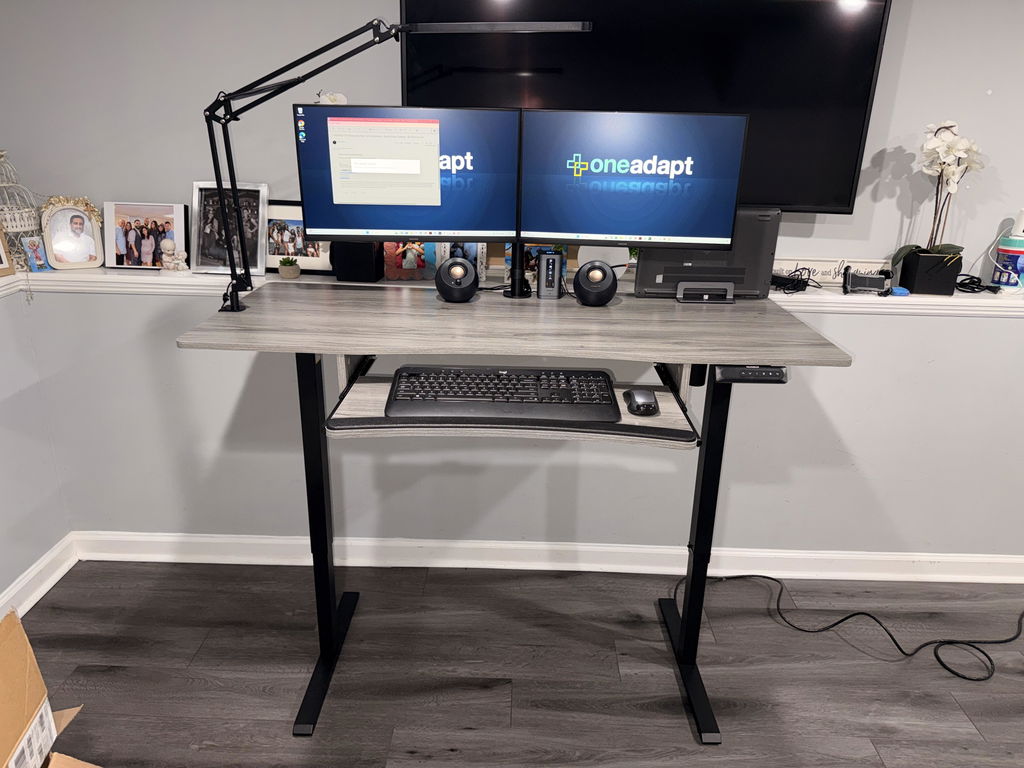
Two screens can dramatically improve multitasking and information access, but they require a solid mounting plan. A dependable dual monitor mount supports each arm up to 22 pounds and accommodates screens up to 30 inches. The VESA compatibility (75x75mm or 100x100mm) lets you pair a wide range of displays with a clean, clutter-free back. By positioning the monitors at the correct height and distance, you minimize eye strain and tilt your posture toward a more natural, neutral spine. If you’re shopping for modern office furniture in places like Toronto or surrounding areas, look for mounts that offer tilt, rotation, and vertical adjustments so you can tailor each screen to your line of sight.
Beyond the mount itself, consider cable management and a sturdy desk surface. A robust frame ensures your setup remains stable under daily use, even if you adjust height or angle during calls and long work sessions. When you pair a strong dual-monitor setup with a high-quality footrest, you get a more balanced workflow that supports both acute attention and long-range planning.
Adding the Footrest: Grounding Your Posture and Circulation
The FREE Footrest is designed to keep your feet and legs elevated, which helps improve posture and reduce fatigue. An ergonomic footrest can decrease pressure on the lower back and hips, encouraging a more open hip angle and better circulation throughout the day. When your feet are comfortably supported, you tend to sit more upright, which reduces the tendency to slump forward and strain your shoulders. This is especially valuable when you’re seated for extended periods in front of a dual monitor setup or a standing-desk hybrid that requires you to switch between positions.

Using a footrest also supports a natural movement routine. You can gently rock or adjust leg positions to stretch muscles during breaks, which helps prevent stiffness that mid-day tasks can bring. For those evaluating office furniture in Canada, a reliable footrest pairs well with a standing-desk concept, giving you an extra degree of latitude to move between sitting and standing without losing ergonomic support.
Many workplaces in Toronto and Markham emphasize ergonomic upgrades as part of a healthy work culture. When you’re investing in a home setup or a flexible-office layout, a strong foundation matters most: a stable monitor system nearby, a comfortable seat, and a supportive footrest that keeps your legs engaged. The goal is simple—deliver comfort without sacrificing productivity, even during back-to-back meetings or creative sprints.
Cheat Sheet: Quick Adjustments That Make a Difference
Adjustability matters. A headrest with up to 2.8 inches of height customization and armrests that adjust 3.5 inches can be a game changer when you’re dialing in personal comfort. While these chair features aren’t the only factor, they complement a good desk, an adjustable monitor arm, and a footrest by ensuring your neck, shoulders, and hips stay aligned. It’s not just about one gadget—it’s about dialing in a whole setup that supports your posture from the moment you sit down until your last task of the day.
Where to Find the Right Office Furniture: Local Options and Smart Planning
If you’re assembling a full workspace, you’ll want to think beyond the single product. In Canada, many buyers consider a mix of pieces—standing desks, dual monitor mounts, ergonomic chairs, and footrests—to build a cohesive system. For those starting fresh in cities like Toronto, you’ll find a range of stores and brands offering modern office furniture that fits small apartments and larger home offices alike. In Markham, local options often blend practical function with stylish design, making it easier to curate a workspace that looks as good as it feels. If you’re budgeting, consider looking at used office furniture in Toronto as a way to stretch your dollars while still getting reliable pieces with long lifespans. When space planning, you might also explore an L-shaped reception desk Canada-wide to create zones for work and collaboration, especially in shared home offices or small studios.
For broader inspiration, browse “Office Source desks” and other Canadian vendors that emphasize durability and value. The final layout should feel like a single, integrated system—screens at eye level, arms within easy reach, a chair that supports your lumbar curve, and a footrest that nudges you toward a comfortable, upright posture at every stage of the day.
Maintenance, Care, and Longevity: Protect Your Investment
Keeping your ergonomic gear in good condition is part of responsible setup maintenance. Periodic light cleaning, checking monitor arms for tightness, and ensuring the footrest remains stable are simple steps that extend the life of your equipment. With regular care, your dual monitor mount, desk frame, chair, and footrest will continue to support your productivity for years to come. And when your needs evolve, you’ll have a modular system that’s easy to upgrade rather than replace entirely.
Putting It All Together: Your Next Steps
Start by mapping your space and listing how you’ll use it. If you spend long hours with multiple documents, a dual monitor setup reduces neck turnover and keeps key information in your line of sight. Add a footrest to encourage better posture and more comfortable leg positioning. Choose an adjustable chair that supports your spine and offers a comfortable range for reclining and movement. Finally, look at your local options in Toronto or Markham to find pieces that fit your space and budget, including standing-desk concepts that promote healthier movement throughout the day.
Investing in ergonomic gear isn’t just about comfort—it’s about sustaining focus, reducing pain, and maximizing your daily output. With the right monitor arms, a supportive chair, and a reliable footrest, you’ll experience a workspace that’s ready for today’s tasks and tomorrow’s growth.


Share:
Optimal Ergonomic Dual Monitor Setup for Standing Desks
Create an Ergonomic Desk Setup with Dual Monitor Mounts