



Optimal Ergonomic Dual Monitor Setup for Standing Desks
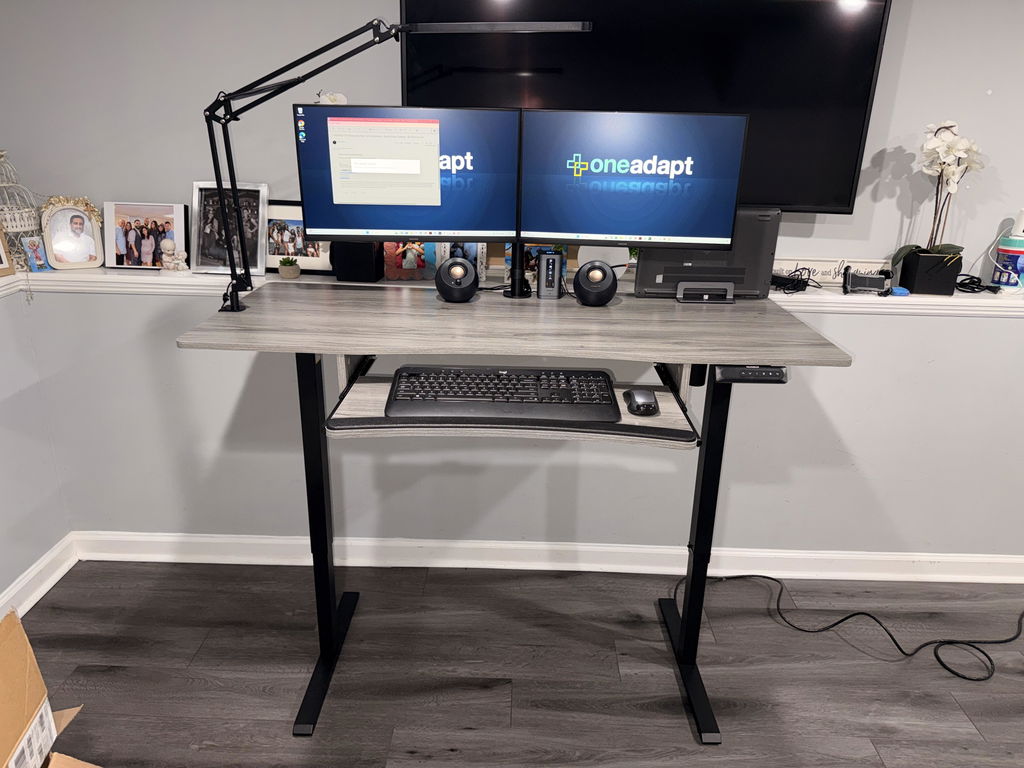
In today’s flexible workspace, pairing a sit-stand desk with a well-positioned monitor mount can transform comfort and productivity. A thoughtful dual monitor setup reduces neck and eye strain while boosting focus during long work sessions, calls, or design tasks. The Ergo Workstation from HUANUO is a standout option for those seeking a seamless integration of height-adjustability and multi-monitor capability.
With a generous height range of 28.0" to 45.7", this system makes it easy to switch between sitting and standing without sacrificing monitor positioning. Whether you’re perched at your desk or standing to tackle a different kind of task, the mounting solution adapts to your needs as part of a broader ergonomic workflow.
Why ergonomic, adjustable monitors matter
Poor monitor height forces you to crane your neck, slouch, or lean forward—habits that can contribute to long-term pain. A flexible mounting system lets you position monitors at eye level and at the proper distance, reducing neck strain and improving visual clarity. The Ergo Workstation’s adjustable arms support a natural line of sight, so you can switch between tasks without sacrificing comfort. When you pair this mount with a sit-stand desk, you create a workflow that respects posture across different tasks and times of day.
For teams juggling multiple screens, a robust mounting solution also helps keep the desk clean and organized. A tidy setup reduces distractions and frees up space for essential tools like a keyboard, notebook, or a small footrest—an often overlooked but important part of long-day comfort.
What to look for in a dual monitor mount
Key considerations include how many monitors you want, how large they are, and how much weight the arms can handle. The HUANUO design supports up to two monitors per arm with a maximum load of up to 22 pounds per monitor and VESA mounting options of 75x75mm or 100x100mm. This makes it a versatile choice for most 13"–30" displays, and it works well for wide ultrawide setups when configured thoughtfully. If you’re planning a larger, 4-monitor setup, you’ll appreciate the stability and spacing provided by the dual-arm design.

In addition to the load capacity, consider the range of motion. Tilt, swivel, and 360-degree rotation ensure you can switch between landscape and portrait modes as needed. A wide height range helps align the monitors with your eyes, whether you’re sitting or standing. Keep in mind that some people compare desk-mounted options to wall-mounted arms: wall-mounted setups free desk space but require wall strength and secure mounting. The Ergo Workstation’s desk-mounted design keeps cables tidy and allows quick adjustments without wall modifications.
Comparing options: Ergotron, wall-mounted arms, and more
Premium brands like Ergotron offer reliable monitor stands known for smooth motion and durable build quality. The HUANUO Ergo Workstation delivers similar performance with the advantage of a broad height range and dual-monitor versatility. If you’re curious about wall-mounted monitor arms, you gain extra desk space and a sleeker surface, but you’ll lose some quick-access adjustability that a desk-mounted system provides in busy, changing workflows.
For larger or multi-monitor setups, many buyers search for multi-monitor brackets designed to handle heavier configurations and more screens. The HUANUO system is designed to scale in a practical way with two arms capable of supporting multiple displays, while staying compatible with common VESA patterns for easy mounting. If you’re evaluating display sizes, you may see references to 32-inch desk mounts. While some mounts claim 32" compatibility, the Ergo Workstation supports up to 30" displays per monitor, so check the exact width and weight limits for your specific screens before purchasing.
Color and finish also come into play during aesthetic planning. If you’re shopping for a white dual monitor stand to match a bright, minimalist workspace, you’ll find a range of options in the market. The HUANUO system is typically offered in professional finishes that pair well with most desks, often balancing softly against darker or lighter setups depending on your room design.
How to set up the Ergo Workstation for comfort and productivity
Begin by securing the mount to a stable desk surface, ensuring the base has enough clearance for full arm motion. Attach each monitor with the appropriate VESA plate (75x75mm or 100x100mm) and mount them onto the arms. Position the monitors so the top of the screen sits roughly at eye level when you’re seated, with the center about an arm’s length away. If you switch between sitting and standing, aim for a height that remains comfortable in both postures, and adjust the desk height to maintain 90-degree elbow angles when typing.
Cable management is a quick win for a cleaner workspace. Route power cords and video cables through the arms’ channels or along the desk edge to minimize tangles. A tidy setup reduces time spent untangling cables and helps you stay focused on work.
With the monitor height and distance dialed in, you’ll notice less eye strain and fewer postural shifts during long tasks. This is particularly valuable for those who spend hours editing video, crunching numbers, or coordinating large spreadsheets where precise screen placement matters for accuracy and efficiency.
Maximizing comfort with spacing, posture, and breaks
Beyond monitor placement, small changes can yield big results. Pair the mount with a supportive chair and, if possible, a footrest to maintain comfortable feet and an open hip angle. Take short breaks to stand, stretch, and reset your posture. These habits—not just the gear—contribute to long-term comfort and productivity throughout your workday.
Maintenance and care tips
Regularly check mounting joints for looseness and tighten screws as needed, especially after moving monitors or reconfiguring space. Wipe down the arms with a mild cleaner and a soft cloth to prevent dust buildup that can hinder smooth motion. If you need to reconfigure setups, re-tighten joints after adjustments to maintain stability.
In summary, a flexible, monitor-ready workspace like the Ergo Workstation helps you stay comfortable, productive, and healthy across a full day of work, whether seated, standing, or transitioning between tasks.


Share:
Ergonomic Monitor Mounts for a Healthier Desk Setup Today
Ergonomic Home Office Setup: Dual Monitors & Footrest