

Create an Ergonomic Desk Setup with Dual Monitor Mounts
If you spend long hours at a computer, your posture and comfort matter just as much as performance. A solid ergonomic setup starts with a desk that matches your work style and a monitor arrangement that keeps your eyes level and your neck relaxed. An adjustable system that combines a standing desk, a keyboard tray, and a reliable dual monitor mount can dramatically reduce strain and boost focus throughout the day.
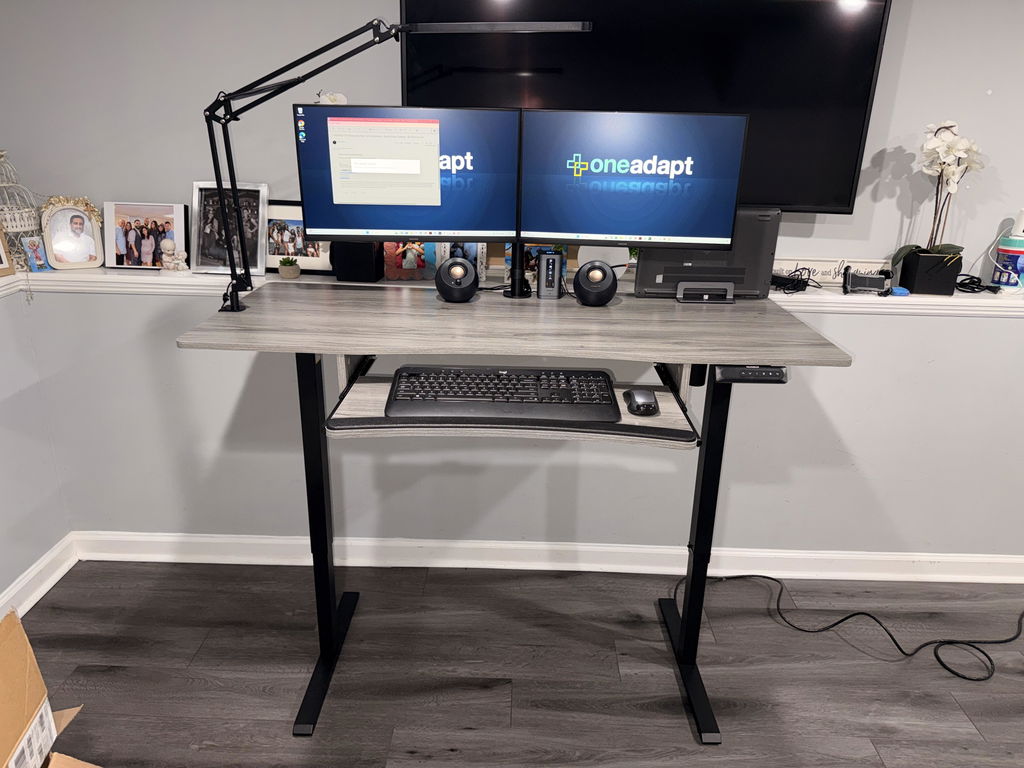
This article explores how to build an ergonomic workspace using a HUANUO bundle that includes a height-adjustable desk, a dual monitor mount, and other accessories designed to improve posture. We’ll cover what to look for in a dual monitor mount, how to position your screens for optimal comfort, and why this setup is a smart choice for home offices, cubicles, and hybrid workspaces.
Why a dual monitor mount matters for ergonomics
Two monitors arranged at the right height can dramatically improve productivity while keeping your spine aligned. A quality dual monitor mount supports each screen with precise reach, tilt, and rotation so you can place the top line of your displays at eye level and minimize neck twisting. The system described here can handle monitors up to 32 inches in size and supports a solid weight capacity, keeping your screens steady even during bursts of motion or typing.
Compared with a traditional freestanding stand, a good dual monitor mount saves desk space and lets you fine-tune each monitor’s position. If you’ve ever explored an ergotron monitor stand, you know the value of smooth adjustment and dependable construction. A modern HUANUO mount offers similar flexibility with a clean, space-saving design that fits neatly into a standing-desk workflow.
What to look for in a dual monitor mount
- Size and weight support: Look for a system that accommodates up to 32 inches and a weight range that matches your monitors. The setup described here supports up to heavy loads per arm, helping you run two large displays without sag.
- VESA compatibility: Ensure the mount uses standard patterns such as 75x75mm or 100x100mm, which cover most consumer and professional displays.
- Adjustability: A good mount offers height adjustment, tilt, swivel, and rotation so you can align the screens with your natural line of sight.
- Desk compatibility: Consider clamps or grommets that fit your desk thickness and edge design, especially if you’re pairing the mount with a standing desk.
- Color and styling: If aesthetics matter, choose a finish that matches your workspace and a design that doesn’t clash with other components in your ergonomic bundle.
- Cable management: Integrated channels help keep cords neat and reduce snags as you adjust the screens.
With a dual monitor mount in place, you can also optimize other ergonomic elements, such as a keyboard tray and an adjustable chair. The HUANUO bundle includes a keyboard tray to keep wrists, elbows, and shoulders aligned without compromising screen view, plus a height-adjustable chair to support the spine during long sessions.
Wall-mounted arms vs. desk-mounted options
Wall-mounted monitor arms can free valuable desk space and offer a clean aesthetic, but they’re not always the most flexible option for every workflow. Desk-mounted arms, like the HUANUO dual monitor mount, are typically easier to adjust during sit-stand transitions and in dynamic work sessions. If your setup requires a wall-mounted solution, look for arms with strong extension and a range of motion that matches your needs. For most home offices aiming for easy adjustability and quick reconfiguration, a desk-mounted solution provides reliable ergonomic benefits without requiring wall modifications.
When people search for alternatives, terms like wall mounted monitor arms, multi monitor brackets, and 32 inch desk mount often come up. It’s worth noting that a high-quality desk-mounted dual monitor mount can deliver the same level of flexibility and support, with the added benefit of being compatible with a standing desk workflow and integrated with other ergonomic gear in your bundle.

32 inch desk mount and compatibility tips
Monitors up to 32 inches fit well into most dual-monitor systems, provided the weight is within the arm’s load rating. To install, verify the VESA holes on the back of each monitor (75x75mm or 100x100mm are standard) and ensure the mounting surface is solid enough to support the clamp or grommet hardware. For a standing desk setup, make sure the monitor arms can move through a full range of motion without hitting the desk edge or the keyboard tray. The result is a comfortable, natural posture for long work sessions.
If you’re shopping for a white dual monitor stand, know that the market offers a variety of finishes to suit different aesthetics. The key is to choose a durable, well-built model that provides stable support and smooth adjustments. The HUANUO system discussed here is designed to integrate with a complete ergonomic setup—standing desk, keyboard tray, chair, and footrest—to promote better posture across the day.
Practical steps to set up your ergonomic workstation
1) Start with your standing desk height. Adjust so your elbows are at about a 90-degree angle when typing, with your wrists straight. 2) Mount both monitors so the top of each screen sits at or slightly below eye level. 3) Position the screens about an arm’s length away to reduce eye strain. 4) Use the keyboard tray to align wrists and shoulders, freeing space for comfortable mouse movement. 5) Add the adjustable chair and footrest to support a healthy seating range and leg posture. 6) Manage cables with channels or clips to prevent tangling as you move between sitting and standing.
Maintenance and care tips
Regularly check the clamps and joints for looseness and tightness, especially after moving the monitor arms or adjusting the desk height. Wipe down the arms and monitor backs to prevent dust buildup that can affect movement. If you encounter stiffness, apply a small amount of silicone-based lubricant to pivot points and re-check mounting screws. With proper care, your dual monitor mount should stay steady and responsive for years of daily use.
Final thoughts on building an ergonomic workstation
Investing in a high-quality dual monitor mount is an essential step toward a healthier, more productive work routine. When paired with a height-adjustable desk, an adjustable keyboard tray, and a supportive chair, this setup helps you maintain neutral joints, reduce fatigue, and sustain focus through long workdays. If you’re starting from scratch, a bundled approach like the HUANUO collection can simplify decisions and provide a cohesive, well-supported workstation that adapts to your needs as they evolve.


Share:
Ergonomic Home Office Setup: Dual Monitors & Footrest
Ergonomic Monitor Arm for 13-40 Inch Screens with USB Hub